
Manual
How to Unify Shopify, WordPress, Email, WhatsApp, and Appointments
Many growing businesses do not have a shortage of software. They have a shortage of connection between the tools they already use. A customer may discover the brand through a campaign, browse products on Shopify, book a service on WordPress, receive an email, reply on WhatsApp, and finally purchase in a store. When each interaction lives in a separate system, the business cannot see the complete journey.
This representative case study explains the problem WebPlatform is designed to solve. It does not describe a named customer or claim an invented percentage improvement. It shows the operating model, the data flow, and the outcomes a merchant can validate after implementation.
The business situation
Consider a wellness and retail company with two important digital properties. Its Shopify store handles product discovery and ecommerce orders. Its WordPress website explains services, captures enquiries, and accepts appointments. The marketing team also sends email and WhatsApp communication.
Each tool works, but the hand-offs create daily friction:
- Lead sources are recorded differently—or not recorded at all.
- Campaign reports show delivery, opens, and clicks but not what happened on the website afterward.
- Appointment and order activity is separated from marketing engagement.
- Team members manually copy customer details between systems.
- Follow-up depends on personal memory instead of a consistent workflow.
- Customers may receive irrelevant or duplicated communication.
What WebPlatform connects
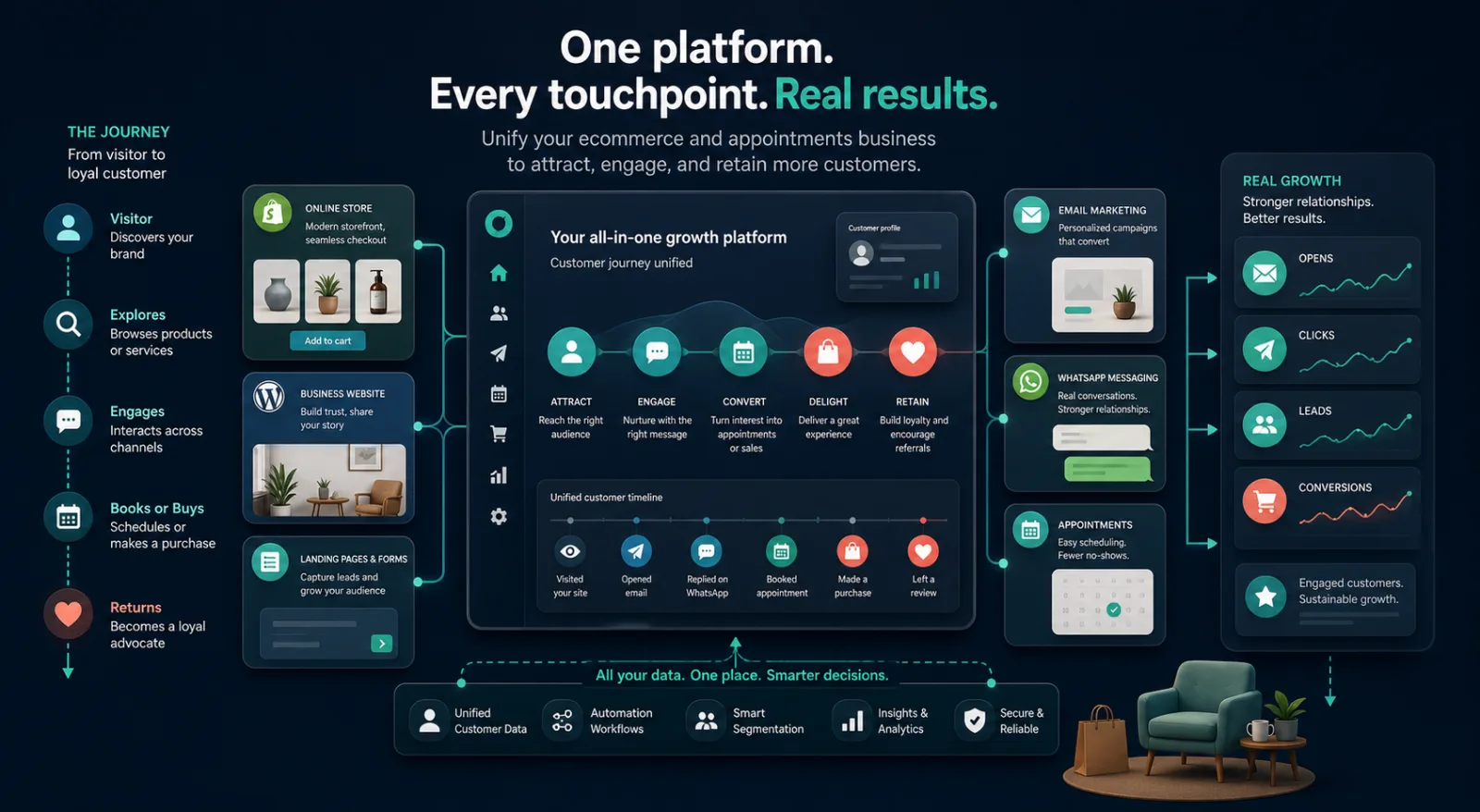
WebPlatform acts as the engagement and reporting layer around the merchant's existing platforms. The business does not need to replace Shopify or WordPress. Instead, approved connectors and tracking tools bring relevant customer events into a shared workspace.
Shopify customer and order activity
WebPlatform Engage connects an eligible Shopify store through Shopify OAuth and uses Shopify-managed billing for applicable paid plans. Supported customer and order events can be synchronized for the enabled email and messaging modules, subject to merchant configuration, permissions, and customer consent.
WordPress and WooCommerce activity
WebPlatform WordPress connectors support guided account linking for transactional email, messaging, and eligible WooCommerce events. The setup wizard validates the connection so the merchant can confirm that the website is sending events before relying on it in production.
Campaign and website behaviour
Email tracking records supported delivery, open, and click events. A lightweight website script can associate permitted page visits and conversion events with a campaign. Events are queued for asynchronous processing so tracking does not block the merchant website's main page rendering.
Appointments and conversations
Appointment events and consent-aware WhatsApp communication can become part of the same customer timeline. Instead of treating a booking, an order, and a conversation as unrelated records, the team sees the sequence in which they occurred.
The unified journey in practice
- Attract: A visitor arrives through a tagged campaign, search result, social post, or direct visit.
- Identify: The visitor submits an enquiry, signs in, subscribes with consent, books, or purchases.
- Engage: The merchant sends an appropriate email or approved WhatsApp message based on the customer's status and permissions.
- Convert: The customer returns to a relevant page, books an appointment, completes an order, or takes another configured action.
- Understand: Reporting connects the campaign and website events so the merchant can evaluate the journey rather than a single click.
- Retain: The team uses the customer timeline to plan a useful follow-up without repeating irrelevant messages.
What changes for the customer, team, and owner
For the customer
Communication can reflect what the customer actually did. Someone who already booked should not continue receiving a generic booking reminder. A customer who purchased a product can receive relevant service, support, or replenishment information instead of the same acquisition message.
For the operating team
Staff can review one timeline before contacting the customer. They can see the source, recent campaign engagement, website activity, booking status, and eligible commerce events without opening several unrelated dashboards.
For the business owner
The owner gains a clearer reconciliation path. Campaign cost and message usage can be compared with engagement, leads, appointments, and configured conversion events. This supports better decisions without claiming that every open or click caused a sale.
Privacy, consent, and performance safeguards
A connected journey must not become uncontrolled surveillance. Merchants remain responsible for selecting a lawful purpose, collecting required consent, respecting channel rules, and configuring retention appropriate to their business.
- Only required event data should be collected.
- WhatsApp and promotional email audiences should follow consent and provider requirements.
- Tracking identifiers should avoid exposing unnecessary personal data in page URLs.
- Queued ingestion should isolate tracking work from the website's customer-facing response.
- Setup validation should be completed before campaigns are launched.
- Merchants should test unsubscribe, deletion, and provider-disconnection scenarios.
A practical implementation checklist
- List every place where leads, customers, bookings, and orders currently enter the business.
- Choose the first outcome to measure, such as an enquiry, appointment, purchase, or qualified lead.
- Connect Shopify or install the required WordPress connector.
- Validate the website domain and sending domain through the guided setup.
- Install and verify the lightweight website tracking script where required.
- Create a controlled test campaign and complete the journey as a test customer.
- Confirm that opens, clicks, website events, and the selected outcome appear in reporting.
- Review consent, access rights, data retention, usage limits, and billing reconciliation before launch.
Start with one journey
The most reliable rollout begins with one audience, one campaign, and one measurable outcome. Once the merchant can validate that journey end to end, additional channels and automations can be added without losing operational clarity.
Explore the Shopify and WordPress connectors, compare WebPlatform packages, or contact WebPlatform to map your first connected customer journey.